







What is The Booking.com Phishing Scam?
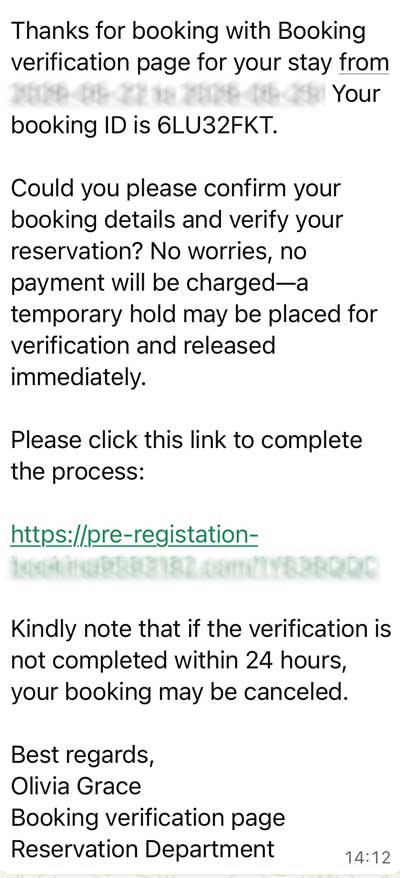
In simple terms, hackers are using a technique called "Booking.com Phishing" or "Message Interception." Instead of sending a fake email that looks like it's from a hotel, they are reported to have actually managed to get inside the hotel’s real account on Booking.com.
What the hackers are doing:
-
Stealing Credentials: They first use techniques such as to trick hotel staff into downloading malware (often via a fake "special request" email). This gives the hackers the login details for the hotel’s official Booking.com portal.
-
Sending Official Messages: Because they are inside the real system, they send you a message through the official app or the actual chat window on the website. This makes the message look 100% legitimate.
-
The "Payment Failure" Scare: They tell you your booking will be cancelled unless you "re-verify" your credit card or provide payment details via a link they provide.
-
Stealing Money: The link leads to a fake website that looks exactly like Booking.com. When you enter your card details, the hackers steal your information and your money.
What holidaymakers must do:
If you have received messages like this, do not panic. Here is how to stay safe:
1. Never click links in messages Even if the message is inside the official Booking.com app, do not click links that ask for payment or "card verification." Booking.com almost never requires you to re-verify your card via a chat link.
2. Check the URL (Web Address)
If you do click a link, look at the address bar. If it isn't exactly
booking.com
(for example, if it says
booking-verification-check.com
or
check-your-reservation.com
), it is a scam.
3. Contact the hotel directly Don't reply to the message in the app. Look up the hotel’s phone number on Google or their official website and call them. Ask: "Did you just send me a request for payment?" Usually, the hotel will be unaware the messages are being sent.
4. Contact Booking.com support If you are worried, use the "Help" section of the app to speak to an official customer service agent.
5. What to do if you already paid: If you have already entered your details into one of these links:
-
Call your bank immediately to freeze your card.
-
Report the fraud to Action Fraud (in the UK) or your local cybercrime authority.
Change your Booking.com password.
Summary: The most important thing to remember is that the official chat system can be compromised. Just because the message is "inside the app" doesn't mean it is safe. Always verify payment requests by calling the hotel.